Docker Compose 配置详解
基于
docker-compose.yaml,逐块拆解各配置的含义与设计思路。
源码解析
# Docker Compose - 本地开发环境
# 一键启动所有依赖服务(PostgreSQL、Redis、Prometheus、Grafana)
# 使用方式:docker-compose up -d
#
# 这模拟了生产环境中各个组件的配合:
# - 应用服务(saas-shortener)
# - 数据库(PostgreSQL) → 生产环境用云数据库(如 AWS RDS)
# - 缓存(Redis)→ 生产环境用云 Redis(如 AWS ElastiCache)
# - 监控(Prometheus)→ 生产环境用 Prometheus Operator
# - 可视化(Grafana)→ 生产环境用 Grafana Cloud 或自建
#
# ==================== 资源规划(2C4G 服务器) ====================
# 组件          | 内存限制 | 说明
# Go 应用       | 128MB   | Go 二进制非常轻量
# PostgreSQL    | 512MB   | 适当限制 shared_buffers
# Redis         | 128MB   | 学习项目数据量小
# Prometheus    | 512MB   | 限制时序数据内存占用
# Grafana       | 256MB   | 前端服务
# 合计          | ~1.5GB  | 预留约 2.5GB 给系统和 Docker 引擎

services:
  # ==================== 应用服务 ====================
  app:
    build:
      context: ../../
      dockerfile: deploy/docker/Dockerfile
    container_name: saas-shortener
    ports:
      - "8080:8080"
    environment:
      # 12-Factor App: 所有配置通过环境变量注入
      - APP_ENV=development
      - SERVER_PORT=8080
      - DB_HOST=postgres
      - DB_PORT=5432
      - DB_USER=postgres
      - DB_PASSWORD=postgres
      - DB_NAME=saas_shortener
      - DB_SSLMODE=disable
      - REDIS_ADDR=redis:6379
      - REDIS_PASSWORD=
      - TENANT_DEFAULT_RATE_LIMIT=100
      - TENANT_MAX_URLS=1000
      # Go 运行时优化(小内存服务器)
      - GOMAXPROCS=2
      - GOMEMLIMIT=100MiB
    depends_on:
      postgres:
        condition: service_healthy
      redis:
        condition: service_healthy
    restart: unless-stopped
    # 资源限制 - 防止单个容器吃满内存导致 OOM
    deploy:
      resources:
        limits:
          cpus: '0.5'
          memory: 128M
        reservations:
          cpus: '0.1'
          memory: 32M
    networks:
      - saas-network

  # ==================== PostgreSQL 数据库 ====================
  postgres:
    image: postgres:16-alpine
    container_name: saas-postgres
    restart: unless-stopped
    ports:
      - "5432:5432"
    environment:
      - POSTGRES_USER=postgres
      - POSTGRES_PASSWORD=postgres
      - POSTGRES_DB=saas_shortener
    # PostgreSQL 内存优化(适配小内存服务器)
    command:
      - "postgres"
      - "-c"
      - "shared_buffers=128MB"        # 默认128MB,小服务器够用
      - "-c"
      - "effective_cache_size=256MB"   # 告诉优化器可用缓存大小
      - "-c"
      - "work_mem=4MB"                # 每个排序/哈希操作的内存
      - "-c"
      - "max_connections=50"          # 限制最大连接数(默认100太多)
    volumes:
      - postgres_data:/var/lib/postgresql/data
    healthcheck:
      test: ["CMD-SHELL", "pg_isready -U postgres"]
      interval: 5s
      timeout: 5s
      retries: 5
    deploy:
      resources:
        limits:
          cpus: '0.8'
          memory: 512M
        reservations:
          cpus: '0.2'
          memory: 128M
    networks:
      - saas-network

  # ==================== Redis 缓存 ====================
  redis:
    image: redis:7-alpine
    container_name: saas-redis
    restart: unless-stopped
    ports:
      - "6379:6379"
    # Redis 内存限制:超过后使用 LRU 策略淘汰旧数据
    command: redis-server --maxmemory 64mb --maxmemory-policy allkeys-lru
    volumes:
      - redis_data:/data
    healthcheck:
      test: ["CMD", "redis-cli", "ping"]
      interval: 5s
      timeout: 5s
      retries: 5
    deploy:
      resources:
        limits:
          cpus: '0.3'
          memory: 128M
        reservations:
          cpus: '0.1'
          memory: 32M
    networks:
      - saas-network

  # ==================== Prometheus 监控 ====================
  # Prometheus 是云原生监控的事实标准
  # 它通过 Pull 模式定期从应用的 /metrics 端点拉取指标数据
  prometheus:
    image: prom/prometheus:v2.51.0
    container_name: saas-prometheus
    restart: unless-stopped
    ports:
      - "9090:9090"
    volumes:
      - ../k8s/monitoring/prometheus.yaml:/etc/prometheus/prometheus.yml
      - prometheus_data:/prometheus
    command:
      - '--config.file=/etc/prometheus/prometheus.yml'
      - '--storage.tsdb.path=/prometheus'
      - '--storage.tsdb.retention.time=7d'        # 只保留7天数据(节省磁盘)
      - '--storage.tsdb.retention.size=1GB'        # 最多占用1GB磁盘
      - '--web.console.libraries=/etc/prometheus/console_libraries'
      - '--web.console.templates=/etc/prometheus/consoles'
      - '--web.enable-lifecycle'
    deploy:
      resources:
        limits:
          cpus: '0.5'
          memory: 512M
        reservations:
          cpus: '0.1'
          memory: 128M
    networks:
      - saas-network

  # ==================== Grafana 可视化 ====================
  # Grafana 是最流行的监控可视化平台
  # 它从 Prometheus 读取指标数据,展示成漂亮的仪表盘
  grafana:
    image: grafana/grafana:10.4.0
    container_name: saas-grafana
    restart: unless-stopped
    ports:
      - "3000:3000"
    environment:
      - GF_SECURITY_ADMIN_USER=admin
      - GF_SECURITY_ADMIN_PASSWORD=admin
      - GF_USERS_ALLOW_SIGN_UP=false
    volumes:
      - grafana_data:/var/lib/grafana
      - ../k8s/monitoring/grafana-datasource.yaml:/etc/grafana/provisioning/datasources/datasource.yaml
    depends_on:
      - prometheus
    deploy:
      resources:
        limits:
          cpus: '0.5'
          memory: 256M
        reservations:
          cpus: '0.1'
          memory: 64M
    networks:
      - saas-network

# ==================== 持久化存储 ====================
volumes:
  postgres_data:
  redis_data:
  prometheus_data:
  grafana_data:

# ==================== 网络 ====================
networks:
  saas-network:
    driver: bridge
整体架构概览
本项目用 Docker Compose 一键启动完整的本地开发环境,包含 5 个服务:
┌──────────────────────────────────────────────────────────────┐
│                      saas-network (bridge)                    │
│                                                              │
│  ┌──────────┐    ┌──────────┐    ┌──────────┐               │
│  │ Postgres │    │  Redis   │    │Prometheus│               │
│  │  :5432   │    │  :6379   │    │  :9090   │               │
│  │  512M    │    │  128M    │    │  512M    │               │
│  └────┬─────┘    └────┬─────┘    └────┬─────┘               │
│       │               │               │                      │
│       │ depends_on    │ depends_on    │ depends_on           │
│       │ (healthy)     │ (healthy)     │                      │
│       ▼               ▼               ▼                      │
│  ┌─────────────────────────┐    ┌──────────┐                │
│  │          App            │    │ Grafana  │                │
│  │        :8080            │    │  :3000   │                │
│  │         128M            │    │  256M    │                │
│  └─────────────────────────┘    └──────────┘                │
│                                                              │
│  总计 ≈ 1.5GB,预留 ~2.5GB 给系统和 Docker 引擎               │
└──────────────────────────────────────────────────────────────┘
| 组件 | 镜像 | 端口 | 内存限制 | 角色 |
|---|---|---|---|---|
| App | 本地构建 | 8080 | 128M | Go 应用服务 |
| PostgreSQL | postgres:16-alpine | 5432 | 512M | 关系型数据库 |
| Redis | redis:7-alpine | 6379 | 128M | 缓存 |
| Prometheus | prom/prometheus:v2.51.0 | 9090 | 512M | 指标采集 |
| Grafana | grafana/grafana:10.4.0 | 3000 | 256M | 监控可视化 |
应用服务(App)
app:
  build:
    context: ../../
    dockerfile: deploy/docker/Dockerfile
  container_name: saas-shortener
  ports:
    - "8080:8080"
  environment:
    - APP_ENV=development
    - SERVER_PORT=8080
    - DB_HOST=postgres
    - DB_PORT=5432
    - DB_USER=postgres
    - DB_PASSWORD=postgres
    - DB_NAME=saas_shortener
    - DB_SSLMODE=disable
    - REDIS_ADDR=redis:6379
    - REDIS_PASSWORD=
    - TENANT_DEFAULT_RATE_LIMIT=100
    - TENANT_MAX_URLS=1000
    - GOMAXPROCS=2
    - GOMEMLIMIT=100MiB
  depends_on:
    postgres:
      condition: service_healthy
    redis:
      condition: service_healthy
  restart: unless-stopped
关键配置解读
build — 多阶段构建
context: ../../表示构建上下文是项目根目录dockerfile指向deploy/docker/Dockerfile,使用多阶段构建生成轻量镜像
environment — 12-Factor App 原则
所有配置通过环境变量注入,而不是硬编码在代码中。好处:
- 同一份代码可以在开发、测试、生产环境运行,只需切换环境变量
- 敏感信息(密码等)不进入代码仓库
DB_HOST=postgres这里直接写的是服务名,Docker 网络会自动把它解析为对应容器的 IP
Go 运行时优化(小内存服务器)
| 变量 | 值 | 作用 |
|---|---|---|
GOMAXPROCS |
2 | 限制 Go 使用的 CPU 核心数,避免过度调度 |
GOMEMLIMIT |
100MiB | Go 1.19+ 软内存上限,GC 会在接近此值时更积极回收 |
在容器环境中,Go 默认会检测到宿主机的全部 CPU 核心,而不是容器限制的核心数。手动设置
GOMAXPROCS可以避免不必要的线程开销。
depends_on + condition: service_healthy
depends_on:
  postgres:
    condition: service_healthy
  redis:
    condition: service_healthy
这确保了启动顺序:App 会等 PostgreSQL 和 Redis 的健康检查通过后才启动。如果只写 depends_on: [postgres],Docker 只保证容器启动,不保证服务就绪——数据库可能还在初始化,App 连接就会失败。
restart: unless-stopped
| 策略 | 行为 |
|---|---|
no |
默认,不自动重启 |
always |
总是重启,包括手动停止后重启 Docker 也会拉起 |
unless-stopped |
自动重启,但手动 docker stop 后不会再拉起 |
on-failure |
只在非零退出码时重启 |
unless-stopped 是开发环境的最佳选择——崩溃自动恢复,手动停止时不纠缠。
资源限制(deploy.resources)
deploy:
  resources:
    limits:
      cpus: '0.5'
      memory: 128M
    reservations:
      cpus: '0.1'
      memory: 32M
limits vs reservations
| 配置 | 含义 | 类比 |
|---|---|---|
limits |
硬上限,超过会被 OOM Kill 或 CPU 节流 | 信用卡额度 |
reservations |
预留资源,Docker 保证至少分配这么多 | 银行保底余额 |
为什么要设置资源限制?
在 2C4G 的小服务器上,如果不限制:
- 一个容器内存泄漏可能吃掉所有内存,导致其他容器被 OOM Kill
- 一个服务 CPU 飙升可能饿死其他服务
设置限制后,每个容器都在自己的"格子"里运行,互不影响。
资源规划
| 组件 | CPU 限制 | 内存限制 | CPU 预留 | 内存预留 |
|---|---|---|---|---|
| App | 0.5 核 | 128M | 0.1 核 | 32M |
| PostgreSQL | 0.8 核 | 512M | 0.2 核 | 128M |
| Redis | 0.3 核 | 128M | 0.1 核 | 32M |
| Prometheus | 0.5 核 | 512M | 0.1 核 | 128M |
| Grafana | 0.5 核 | 256M | 0.1 核 | 64M |
| 合计 | 2.6 核 | 1.5 GB | 0.6 核 | 384M |
limits 合计可以超过物理资源(超卖),因为不是每个服务都同时满载。reservations 合计不应超过物理资源。
PostgreSQL 数据库
postgres:
  image: postgres:16-alpine
  command:
    - "postgres"
    - "-c"
    - "shared_buffers=128MB"
    - "-c"
    - "effective_cache_size=256MB"
    - "-c"
    - "work_mem=4MB"
    - "-c"
    - "max_connections=50"
内存参数调优
| 参数 | 值 | 说明 |
|---|---|---|
shared_buffers |
128MB | PostgreSQL 用于缓存数据页的共享内存,通常设为可用内存的 25% |
effective_cache_size |
256MB | 告诉查询优化器"系统总共有多少缓存可用",影响查询计划选择 |
work_mem |
4MB | 单个排序/哈希操作可用内存,注意是每个操作,并发高时实际占用 = work_mem × 并发数 |
max_connections |
50 | 最大连接数,默认 100 太多,每个连接占用 ~5-10MB 内存 |
shared_buffers和effective_cache_size的区别:前者是 PostgreSQL 自己管理的缓存,后者是告诉优化器"操作系统文件缓存 + shared_buffers 一共有多少",帮助它决定用索引扫描还是全表扫描。
Redis 缓存
redis:
  image: redis:7-alpine
  command: redis-server --maxmemory 64mb --maxmemory-policy allkeys-lru
内存淘汰策略
| 参数 | 值 | 说明 |
|---|---|---|
--maxmemory |
64mb | Redis 最大使用内存 |
--maxmemory-policy |
allkeys-lru | 内存满时的淘汰策略 |
常见淘汰策略对比:
| 策略 | 行为 | 适用场景 |
|---|---|---|
noeviction |
内存满了直接报错 | 不允许丢数据 |
allkeys-lru |
淘汰所有 key 中最近最少使用的 | 通用缓存(本项目选用) |
volatile-lru |
只淘汰设置了过期时间的 key 中最少使用的 | 部分 key 需要永久保留 |
allkeys-random |
随机淘汰 | 无明显访问模式 |
allkeys-lru 是缓存场景的最佳选择——总是保留最"热"的数据,冷数据自动淘汰。
Prometheus 监控
prometheus:
  image: prom/prometheus:v2.51.0
  volumes:
    - ../k8s/monitoring/prometheus.yaml:/etc/prometheus/prometheus.yml
    - prometheus_data:/prometheus
  command:
    - '--config.file=/etc/prometheus/prometheus.yml'
    - '--storage.tsdb.path=/prometheus'
    - '--storage.tsdb.retention.time=7d'
    - '--storage.tsdb.retention.size=1GB'
    - '--web.enable-lifecycle'
存储参数说明
| 参数 | 值 | 说明 |
|---|---|---|
storage.tsdb.retention.time |
7d | 时序数据只保留 7 天 |
storage.tsdb.retention.size |
1GB | 最多占用 1GB 磁盘 |
web.enable-lifecycle |
- | 允许通过 HTTP API 热重载配置 |
Prometheus 采用 Pull 模式:它主动定期访问应用的
/metrics端点拉取指标,而不是应用主动推送。这样应用不需要知道监控系统的存在,解耦更彻底。
Grafana 可视化
grafana:
  image: grafana/grafana:10.4.0
  environment:
    - GF_SECURITY_ADMIN_USER=admin
    - GF_SECURITY_ADMIN_PASSWORD=admin
    - GF_USERS_ALLOW_SIGN_UP=false
  volumes:
    - grafana_data:/var/lib/grafana
    - ../k8s/monitoring/grafana-datasource.yaml:/etc/grafana/provisioning/datasources/datasource.yaml
  depends_on:
    - prometheus
GF_USERS_ALLOW_SIGN_UP=false:禁止自助注册,开发环境用 admin/admin 登录即可- 数据源配置通过文件挂载自动导入,启动即连接 Prometheus,无需手动配置
depends_on: prometheus保证 Grafana 在 Prometheus 之后启动
网络(Networks)
networks:
  saas-network:
    driver: bridge
各部分含义
networks:— 定义自定义网络,让容器间安全通信saas-network— 网络名称,仅在此 Docker Compose 项目内可见driver: bridge— 桥接网络驱动,Docker 默认的网络类型,提供容器间隔离通信、端口映射和 DNS 解析
服务间通信示例
services:
  app:
    networks:
      - saas-network

  postgres:
    networks:
      - saas-network
这样配置后:
- App 服务可以通过
postgres主机名访问数据库(DB_HOST=postgres) - 服务间通过服务名互相访问,Docker 内置 DNS 自动解析为容器 IP
- 外部无法直接访问这些服务(除非通过
ports明确暴露)
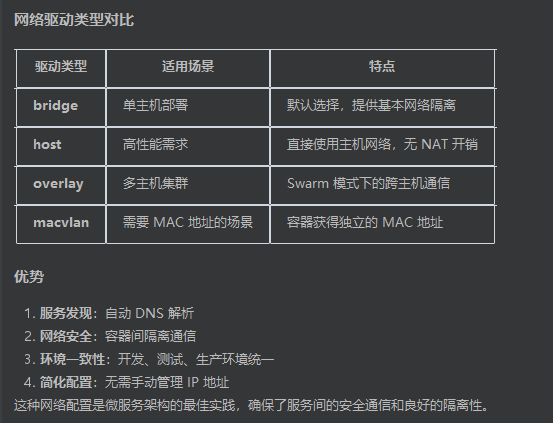
Docker 网络自动分配机制
Docker Engine 自动处理以下过程:
- 创建
saas-network网络(通常分配172.x.x.0/16网段) - 每个容器加入网络时,自动分配唯一 IP 地址
- 建立容器名 → IP 的 DNS 映射
# 查看容器实际分配的 IP
docker exec saas-postgres hostname -i
为什么不需要手动指定 IP?
- 动态分配:IP 地址根据可用范围自动分配,避免冲突
- DNS 解析:通过服务名
postgres自动解析,不依赖具体 IP - 这就是为什么配置中写
DB_HOST=postgres而不是具体 IP 地址——Docker 网络系统自动处理底层细节
健康检查(Healthcheck)
healthcheck:
  test: ["CMD-SHELL", "pg_isready -U postgres"]
  interval: 5s
  timeout: 5s
  retries: 5
参数详解
| 参数 | 值 | 含义 |
|---|---|---|
test |
pg_isready -U postgres |
PostgreSQL 内置检查工具,验证数据库是否接受连接 |
interval |
5s | 每 5 秒执行一次检查 |
timeout |
5s | 单次检查最多等待 5 秒 |
retries |
5 | 连续失败 5 次才标记为 unhealthy |
各服务的健康检查方式
| 服务 | 检查命令 | 原理 |
|---|---|---|
| PostgreSQL | pg_isready -U postgres |
专用工具检测数据库连接 |
| Redis | redis-cli ping |
发送 PING 命令,期望返回 PONG |
| App | wget --spider http://localhost:8080/healthz |
HTTP 请求健康检查端点 |
健康状态流转
容器启动
   │
   ▼
starting ──(interval)──► 执行 test 命令
                              │
                    ┌─────────┴─────────┐
                    ▼                   ▼
                  成功               失败
                    │                   │
                    ▼                   ▼
               healthy          重试(最多 retries 次)
                                        │
                                        ▼
                                   unhealthy
为什么重要?
- 服务依赖管理:
depends_on + condition: service_healthy确保数据库就绪后再启动 App - 故障自动恢复:配合
restart: unless-stopped,不健康的容器会被自动重启 - 避免级联故障:防止 App 向还未就绪的数据库发送请求导致启动失败
持久化存储(Volumes)
volumes:
  postgres_data:
  redis_data:
  prometheus_data:
  grafana_data:
命名卷 vs 匿名卷
命名卷(Named Volumes)— 本项目使用的方式:
volumes:
  postgres_data:                    # 顶层声明

services:
  postgres:
    volumes:
      - postgres_data:/var/lib/postgresql/data  # 引用命名卷
匿名卷(Anonymous Volumes):
services:
  app:
    volumes:
      - /app/data    # 只有容器内路径,没有名称
两者对比:
| 特性 | 命名卷 | 匿名卷 |
|---|---|---|
| 有明确名称 | ✅ | ❌ |
docker-compose down 时保留 |
✅ 默认保留 | ❌ 默认删除 |
| 易于管理和备份 | ✅ | ❌ |
| 可在多个服务间共享 | ✅ | ❌ |
各服务的持久化内容
| 卷名 | 挂载路径 | 存储内容 |
|---|---|---|
postgres_data |
/var/lib/postgresql/data |
数据库文件 |
redis_data |
/data |
Redis RDB/AOF 持久化文件 |
prometheus_data |
/prometheus |
时序指标数据 |
grafana_data |
/var/lib/grafana |
仪表盘配置、用户数据 |
查看和管理卷
# 查看所有命名卷
docker volume ls

# 查看某个卷的详细信息(存储位置等)
docker volume inspect saas-shortener_postgres_data
停止 Docker Compose 环境
.PHONY: docker-down
docker-down:
	docker compose -f $(DOCKER_COMPOSE_LOCAL) down
停止过程
- 向所有容器发送
SIGTERM信号(通知优雅退出) - 等待超时时间(默认 10 秒)
- 对仍在运行的容器发送
SIGKILL强制终止
注意:所有容器几乎同时收到停止信号,不会按照
depends_on的反向顺序停止。
自定义优雅停止时间
services:
  app:
    stop_grace_period: 30s    # 给应用更多时间处理完当前请求
控制删除行为
# 默认:停止容器、移除网络,保留命名卷
docker-compose down

# 删除所有卷(包括命名卷,数据库数据会丢失!)
docker-compose down -v

# 移除孤立容器(Compose 文件中已删除但仍在运行的服务)
docker-compose down --remove-orphans
⚠️ 生产环境慎用
-v参数,它会删除包括数据库在内的所有数据!